
Why Dead Links Are Slowly Killing My Website (And Yours)
Ever clicked a link hoping for an answer, only to get slapped with a big, ugly "404 Not Found" screen? Yeah, me too. It’s annoying. But as a website owner, having those dead links on your own site is worse than annoying—it's quietly draining your traffic and eating away at your AdSense earnings. Let's fix that right now, without the tech headache and without spending a dime.

Quick Summary: What You Need to Do Right Now
- Dead links frustrate your readers and slowly eat away at your ad revenue.
- Check Google Search Console's "404 Not Found" report every week for free data.
- Always use a 301 Permanent Redirect when moving content, never a 302.
- Design a custom 404 page with a search bar to catch lost visitors before they leave.
My Proven Blueprint for Finding and Fixing 404 Errors
You do not need to be a technical genius to solve this problem. I am going to walk you through the exact methods I use to keep my website completely healthy. These steps are highly practical, easy to follow, and backed by basic search engine guidelines.
The Silent Threat of Link Rot
Before we start repairing things, we need to understand what we are actually fighting against. In the digital world, there is a concept known as "link rot." This happens when web pages are moved or deleted over time, causing the original URLs to break.
This is exactly what happens to your website visitors. Every time they click a rotting link, they hit a brick wall. This poor experience tells search engines that your digital library is poorly maintained.
Myth vs Reality: The Truth About Dead Pages
There are a lot of rumors floating around the internet about 404 errors. Let us clear up some of the most common misunderstandings right now.
Myth: Having one or two dead pages will instantly get your site banned from search engines.
Reality: Search engines understand that the internet is constantly changing. A few dead pages will not ruin you, but ignoring them for months will harm your overall user experience.
Myth: You must pay for expensive software to find these errors.
Reality: There are plenty of incredible, completely free tools available that do the job perfectly. You just need to know where to look.
Myth: Deleting the broken link is always the best solution.
Reality: Sometimes, replacing it with a better, more accurate resource provides much more value to your readers.
How to Spot Broken URLs Without Spending a Dime
My absolute favorite tool for this job is completely free and comes directly from Google. It is called Google Search Console, and it is a must-have for anyone serious about their website. If you have not connected your site to this tool yet, you need to do that today.
Once you are logged in, simply look at the left-hand menu. Click on the "Pages" section under the Indexing tab. Scroll down until you see the "Not found (404)" error category.
When you click on that, you will see a list of exactly which URLs are broken on your site. This is real data coming straight from the source. You are seeing exactly what the search engine bots see when they crawl your pages.
I used to completely ignore my Search Console warning emails about indexing issues because they looked too complicated. That was a massive mistake that cost me a lot of organic traffic and daily readers. Always check this "Not found (404)" report at least once a week to catch these sneaky errors early.
Using Free Browser Extensions for Quick Audits
Sometimes you just want to check a single, long-form blog post without opening a heavy dashboard. This is where simple browser extensions become incredibly handy. I personally love using free Chrome extensions designed specifically for this purpose.
You just install the extension, open the blog post you want to check, and click a button. Within seconds, the tool highlights every single link on your page. Healthy links turn green, and broken ones flash bright red.
This is an amazing way to do a quick visual check before you hit the publish button. It saves you from accidentally sending your readers to a dead page. I always run this quick check on my most popular posts at least once a month.
The Smart Way to Handle Redirects
Once you find a broken link, you have to decide what to do with it. If the page is gone forever, simply removing the link is a totally fine option. But if you have moved your own content to a new URL, you need to set up a redirect.
Setting up a Permanent Route
This tells browsers and search engines that the page has permanently moved to a new home. Visitors will automatically be sent to the correct new page without ever seeing an error screen.
This simple action preserves all the hard work and authority your old page built up. It ensures your readers never experience that frustrating dead end. You can easily manage this using free plugins inside your content management system.
Why Your Crawl Budget Matters
You might be wondering why search engines care so much about these dead ends. It all comes down to something called a "crawl budget." Search engines send out automated bots to read and index your website.
These bots only have a limited amount of time to spend on your site. Every time they hit a 404 error, they waste a portion of that precious time. If they waste too much time on dead pages, they might leave before reading your newest, most important articles.
Keeping your links clean ensures these bots can efficiently travel through your site. They will index your fresh content much faster. This directly helps you get your new articles in front of readers much quicker.
Dealing with External Outbound Link Rot
We spend a lot of time worrying about our own internal pages. But what happens when you link out to another website, and they delete their page? This is known as an external broken link, and it reflects poorly on your own brand.
Imagine recommending a fantastic restaurant to a friend, but when they arrive, the building is empty. They are going to be annoyed, and they might not trust your recommendations next time. The same logic applies to your blog readers.
When you find a broken external link, you have two great options. You can either find a new, similar resource to link to, or you can completely remove the link. Replacing it with a fresh, updated source shows your readers that your content is always fresh and accurate.
Spotting the Sneaky Soft 404 Errors
There is a tricky variation of this problem that often confuses website owners. It is called a "soft 404 error." This happens when a page is technically empty or missing, but your server tells the browser everything is fine.
For example, maybe a category page has zero posts in it, but the page still loads normally. Search engines hate this because it creates a terrible experience for the user. They land on a page expecting content, but they find absolutely nothing.
To fix this, you need to make sure empty pages properly return a real 404 status. Alternatively, you can add meaningful content to those empty pages so they are actually useful. Google Search Console will clearly warn you if it detects these sneaky soft errors on your site.
Crafting a Custom Error Page That Keeps Readers Engaged
No matter how hard you try, someone will eventually type a URL wrong and hit an error page. You cannot prevent human typing mistakes. But you can control what happens next.
Most default error pages are ugly, robotic, and confusing. They give the reader no clear options other than clicking the back button. You need to create a custom error page that is helpful and friendly.
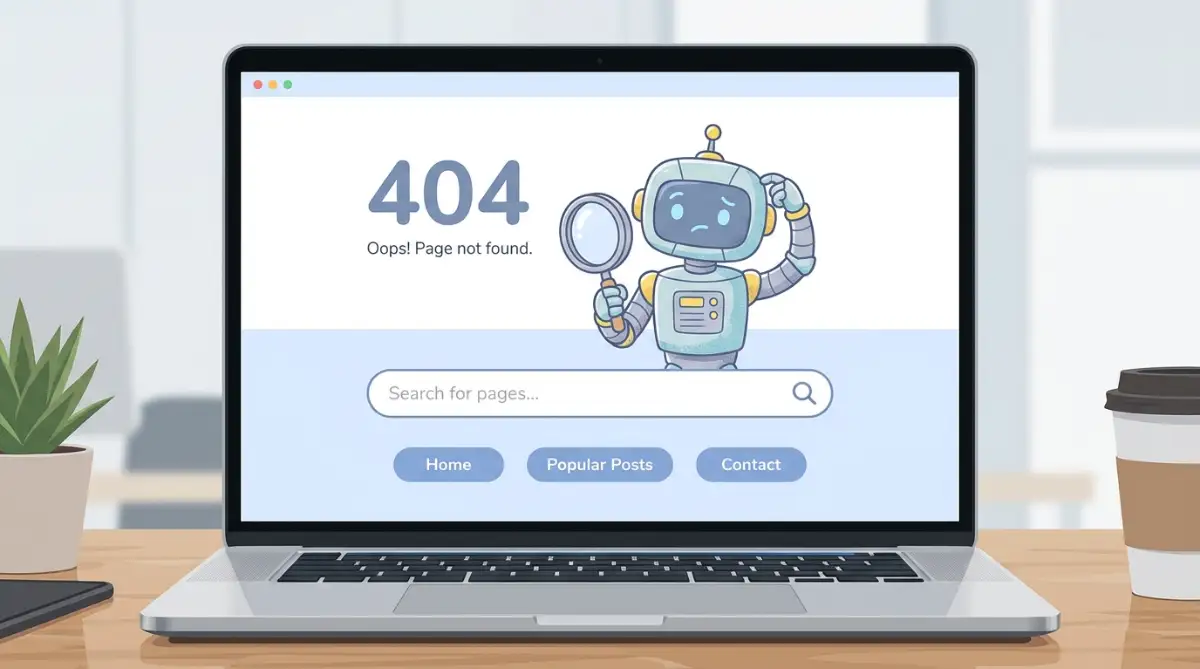
Add a simple search bar right in the middle of the screen. Include links to your most popular or newest articles. Make the message polite, explaining that the page might have moved, and invite them to explore the rest of your site.
Periodic Maintenance vs One-Time Fixes
Treating link maintenance as a one-time project is a recipe for disaster. The internet changes every single day. Websites shut down, articles are renamed, and URLs are constantly updated.
You need to build a simple routine to keep your digital house clean. Set a reminder on your calendar for the first Sunday of every month. Spend just thirty minutes running a quick audit on your top ten most visited pages.
My Personal 3-Step Weekly Audit Habit:
- Question: What tool do I open first?
- Answer: Google Search Console. I head straight to the Pages > 404 errors tab every Monday morning with my coffee.
- Question: How long do I spend on it?
- Answer: Max 5 minutes. If there are under 5 broken URLs, I fix them instantly.
- Question: What if an external link dies?
- Answer: I either swap it with a working source or just remove the hyperlink completely. Don't overthink it!
This tiny habit will put you miles ahead of most website owners who completely ignore site maintenance. Your readers will thank you, and search engines will reward your well-organized structure.
The Real Impact on Your Income
Let us talk about why this directly affects your wallet. If you are displaying ads on your website, your goal is to keep people reading. The longer they stay, the more ads they see, and the more money you make.
When a visitor hits a broken URL, their session ends instantly. They bounce off your site, meaning they will not view any more of your content. This directly lowers your page views per session.
Fewer page views mean fewer ad impressions. By simply keeping your links healthy, you naturally encourage users to click around and read more articles. This effortless increase in engagement directly boosts your daily earnings without needing any extra traffic.
Actionable Routine for Busy Website Owners
I know you are busy writing new content and marketing your brand. You do not have hours to spend staring at spreadsheets of broken URLs. That is why you need a streamlined, simple action plan.
Start by checking your homepage and your top five most popular blog posts. These are the pages driving the most traffic, so they need to be perfect. Use a free browser extension to scan them in under a minute.
Next, log into Google Search Console just once a week while you drink your morning tea. Look for any new spikes in the error reports. If you see a spike, investigate it immediately before it affects your readers.
Finally, whenever you update an old article, make it a habit to check the links inside it. You are already editing the text, so taking ten extra seconds to verify the links is easy. Small, consistent efforts like this will completely transform the quality of your website.
Final Thoughts on Website Health
Keeping your website free of dead ends is a sign of ultimate respect for your audience. You are telling them that their time is valuable and their reading experience matters to you. People naturally gravitate toward websites that feel professional, clean, and well-managed.
Do not let tiny technical errors destroy the amazing content you have worked so hard to create. Take control of your site health today. Start with just one page, find the broken pieces, and mend the gaps.
Your readers will notice the difference, and your analytics dashboard will reflect the positive change. It is a simple process, but the rewards for your traffic and engagement are absolutely massive.
Next-Level Strategies to Keep Your Website Links Spotless
Now that you understand the basics of hunting down dead pages, it is time to upgrade your skills. The internet never stops changing, which means keeping your site healthy requires a slightly smarter approach. You do not just want to fix problems after they happen. You want to stop them before they even begin.
I learned this the hard way after managing a fast-growing blog with thousands of articles. Checking every single URL manually became absolutely impossible. That is when I started using automated systems to do the heavy lifting for me.
By setting up a few smart habits now, you can completely protect your future traffic. These methods will save you hours of manual labor and protect your daily ad earnings from sudden drops. Let us explore some advanced tactics that professional site managers use every single day.
Automating Your Site Audits
The absolute best way to handle this issue is to remove human error entirely. You can use cloud-based crawler tools that automatically scan your entire website every week. These tools act exactly like search engine bots, reading every page and testing every single click.
Once the scan is finished, the software sends a clean report directly to your email inbox. You wake up on Monday morning, open your email, and see exactly which URLs broke over the weekend. This means you can run a comprehensive website audit while you are literally sleeping.
You no longer have to guess if your pages are working properly. You get instant alerts the moment something goes wrong. This proactive approach keeps your user experience perfectly smooth, which is exactly what search engines want to see.
The Secret of Preserving "Link Juice"
In the search engine optimization world, there is a concept people call "link juice" or authority. When a popular website links to your article, they are passing some of their trust and authority over to you. This is what helps your pages rank higher in the search results.
But what happens if that popular website links to a page you accidentally deleted? All of that amazing authority completely disappears into thin air. You lose the SEO benefit, and your rankings can drop overnight.
To prevent this, you must always redirect your deleted pages to the next most relevant active page. You can easily keep an eye on these incoming connections by tracking backlink sources using professional analytics dashboards. By sending that old traffic to a new, helpful article, you save all of that hard-earned trust.
Handling Out-of-Stock Products and Old Services
If you run an online store or offer seasonal services, you will constantly have pages expiring. Many beginners simply delete the product page the moment an item sells out. This is a massive mistake that destroys your organic search traffic.
Instead of deleting the page, leave it active but add a clear message explaining the item is gone. Right below that message, display three or four similar items the customer might want to buy instead. This keeps the visitor engaged and keeps the original page alive for search engines to read.
When you maintain these pages properly, you keep fulfilling user expectations without causing frustration. If a product is truly never coming back, set up a permanent redirect to the main category page. Never leave your potential buyers staring at a dead end.
Mastering Regular Expressions (Regex) for Massive Site Changes
Sometimes you need to change the entire structure of your website. Maybe you want to remove dates from your blog post URLs to make them look cleaner. If you have hundreds of posts, changing them one by one would take weeks.
This is where advanced redirect rules come into play. Most premium SEO plugins allow you to use something called Regular Expressions, or Regex. This is simply a set of commands that tells your server to redirect a massive group of URLs all at once.
You can set up one single rule that automatically forwards every old formatted URL to the new, clean version. It sounds a bit technical, but you can find official documentation directly on the Google Search Central website to help you set it up. It is a massive time-saver when you are redesigning a large project.
Organizing Your Content Architecture
A messy website structure makes it incredibly hard to keep track of your links. If you just publish articles randomly without putting them into proper categories, things will eventually get lost. You need a logical, clean hierarchy.
Think of your website like a filing cabinet. You should have a few main drawers, which are your main topics. Inside those drawers, you have specific folders, which are your sub-topics.
When your articles are neatly organized, finding and fixing errors becomes much faster. You easily know exactly where every piece of content lives. A clean structure also helps search bots understand what your website is actually about.
The Most Dangerous Link Management Traps
Even with the best intentions, I have seen so many creators completely ruin their traffic by making silly mistakes. Fixing errors is important, but doing it the wrong way can actually cause more damage than leaving the error alone. I want to share some incredibly common pitfalls so you can avoid the headache entirely.
When you mess up your redirect strategies, your readers suffer immediately. Imagine a visitor clicking a link on their mobile phone, waiting five seconds for the screen to load, and then getting a blank page. They will hit the back button and likely never return to your brand again.
This directly hurts your ability to grow your audience and make money. Let us look at the worst things you can do when trying to clean up your digital library.
The "Send Everything to the Homepage" Disaster
This is easily the most common mistake I see new bloggers make. They find fifty dead pages on their site, panic, and redirect every single one of them to their homepage. They think this solves the problem because the visitor does not see an error screen anymore.
Why this is a terrible idea:
Imagine you click a link looking for a recipe for chocolate cake. Instead of seeing the recipe, you are suddenly thrown onto the front page of a giant cooking magazine. You have no idea where the cake recipe went, and now you have to search for it all over again.
This creates immense frustration for your visitors. Search engines are smart enough to recognize this lazy tactic, and they will label those redirects as "soft 404s." Always redirect a dead page to something highly relevant, or let it naturally return an error. You can read more about standard web linking guidelines directly from the World Wide Web Consortium to understand why structure matters.
Creating Endless Redirect Chains
A redirect chain happens when Page A forwards to Page B, but Page B forwards to Page C. Sometimes this can loop multiple times before the reader finally lands on the actual article. It is like sending someone on a wild goose chase just to read a single paragraph.
Every time a browser has to jump to a new destination, it adds extra loading time to the journey. Mobile users on slow internet connections will experience massive delays. If the chain gets too long, the browser will simply give up and display an error.
To avoid this trap, you should regularly audit your forwarding rules. If you need to move Page A again, make sure it points directly to the final destination, skipping the middle steps completely. Keep the journey for your readers as short and direct as possible.
Confusing Temporary and Permanent Routes
When you tell a browser to go to a new destination, you have to attach a specific status code to that command. The two most common codes are the permanent 301 and the temporary 302. Mixing these up can totally confuse search engine bots.
To make things super simple, I put together this quick cheat sheet. If you ever get confused about which rule to use, just check this table:
If you use a temporary 302 code, you are telling Google, "Hey, this page is moving just for a few days, so keep the old URL in your memory." If you leave that temporary code active for months, the search engine will refuse to pass authority to your new page. This leads to a massive drop in your traffic.
Only use temporary codes if you are doing brief maintenance on a specific page. For everything else, always use the permanent 301 option. You can find a complete, easy-to-read list of these server codes on the Mozilla Web Developer Network if you want to understand the exact technical definitions.
Forgetting to Update Your Internal Connections
Let us say you properly set up a permanent route from an old post to a brand new one. The problem is technically solved, right? Not entirely.
If you have ten other articles on your blog pointing to that old URL, you are forcing the server to process a redirect every single time someone clicks. This wastes resources and slows down your overall performance. You must go back and update the original text in those ten articles.
Whenever you move a piece of content, use your site's search function to find every place you mentioned it. Change the old links to the new, direct destination. Keeping your internal connections clean is a sign of a highly optimized, professional brand.
Ignoring Search Volume Realities Before Deleting
Sometimes we look at an old, outdated article and decide it is just not