
The Frustrating Reality of Claiming Your Digital Identity
Buying a website name should be exciting, right? But the second you hit that search button, you are hit with weird tech words like DNS, ICANN, and nameservers. Suddenly, you feel like you need a computer science degree just to start a simple blog. I know exactly how annoying that is. Good news? It is actually way easier than it looks, and we are going to clear up the confusion right now.
Starting a new business or a personal blog is supposed to be an exciting adventure. You finally have a brilliant idea, and you know exactly what you want to call it. But the moment you try to claim your perfect web address, everything suddenly stops making sense.
You instantly run into a wall of confusing technical jargon. Words like DNS, ICANN, and nameservers pop up on your screen, making a simple task feel completely impossible. This exact technical roadblock is where many passionate creators simply give up and walk away.

You might spend hours reading articles, only to feel more confused than when you started. It feels like the internet is actively trying to keep you from launching your dream project.
| Key Concept | Actionable Advice (In 30 Seconds) |
| Name Selection | Keep it clean and simple—avoid numbers and weird hyphens. |
| Hidden Fees | Never pay extra for WHOIS privacy (most top registrars offer it for free). |
| Security | Turn on auto-renew today to prevent accidentally losing your domain next year. |
| Ownership | Always buy the domain yourself; never let a web developer own your main account. |
Why Finding a Simple Solution Feels So Hard
When you search for help online, you are often met with terrible advice. This bad information actively hurts your progress and drains your wallet.
- Hidden financial traps: You see an advertisement for a one-dollar web address, but nobody warns you that the renewal price is fifty dollars next time.
- Too much technical slang: Most beginner guides assume you already understand the complicated relationship between a registrar and a web server.
- Aggressive sales tactics: Checkout pages are designed to trick you into adding expensive, unnecessary privacy tools to your cart.
- Scammy domain hoarders: You might end up paying thousands of dollars to a random broker just because they registered your brand name first.
Breaking Down the Web: Your Clear Path to Success
You do not need an advanced computer science degree to understand how the internet works. You just need someone to explain it in plain English.
Think of building a website exactly like building a physical house. Your web hosting is the actual land where you build the house. The domain name is simply your street address.
Without a street address, your customers would have to memorize exact GPS coordinates just to find your business. Let us look at the exact steps you need to take to secure your own address today.
Step 1: Brainstorming and Verifying Your Domain Name Idea
Before you ever pull out your credit card, you need a solid plan. The very first step of the domain name registration process is figuring out what people will type into their browsers.
A great web address is short, memorable, and incredibly easy to spell. If you have to spell it out over the phone, it is probably too complicated for your customers to remember.
Start by writing down at least ten different variations of your brand name. You will find that your very first choice is often already taken by someone else.
Real-Life Scenario: The Local Bakery
Imagine a baker named Sarah who wants to open a shop called "Sarah's Sweet Treats." She checks the internet and finds that the exact matching web address is gone.
Instead of panicking, Sarah gets creative and registers "TrySarahsTreats.com" instead. This alternative is action-oriented, easy to say, and works perfectly for her brand. You should approach your brainstorming with the exact same flexibility.
Myth vs Reality: The Great Extension Debate
The Myth: If you do not get a standard ".com" extension, your business will look unprofessional and completely fail.
The Reality: The internet has grown massively. Modern extensions like ".co", ".io", and ".store" are widely accepted and highly respected by consumers globally.
Step 2: Choosing a Transparent Domain Registra
Once you have your perfect name, you need to find a company to register it for you. These companies are officially called domain registrars.
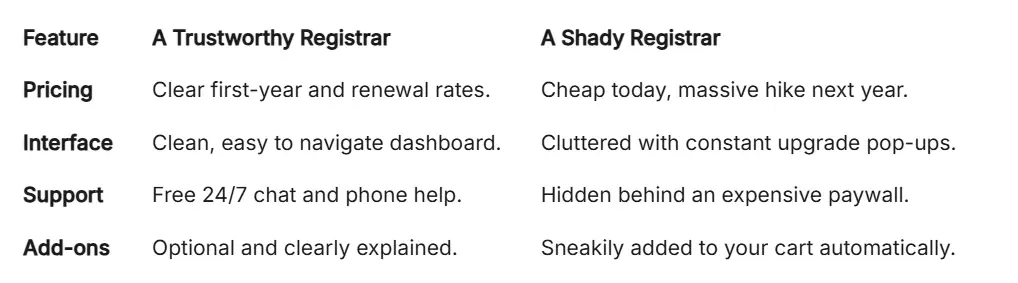
Not all registrars are created equal. Some exist purely to help you, while others want to squeeze every single penny out of your pocket.
You need to look for a registrar that values extreme transparency. They should clearly show you the registration price for today, as well as the exact renewal price for next year.
The Science of ICANN
To understand why registrars exist, you need to know about ICANN (The Internet Corporation for Assigned Names and Numbers). They are the global scientific authority that coordinates all internet addresses.
ICANN ensures that no two people can ever have the exact same web address at the same time. They grant special permission to registrars to sell these addresses on their behalf. This strict logical system keeps the entire internet functioning smoothly.
Comparing Your Options
When evaluating a registrar, always look at their history and customer reviews. A good company will give you full control over your settings without making you pay extra fees.
Step 3: Navigating the Checkout Safely
You have picked your name and found a great registrar. Now, you must survive the checkout process without falling into expensive traps.
My Jargon-Free Dictionary
- Registrar: The store where you buy your website name (like buying a car).
- Web Host: The parking garage where you keep the car safely.
- DNS/Nameservers: The GPS system that tells people exactly where your car is parked.
- ICANN: The internet police making sure nobody steals your name.
When you add your web address to the digital cart, the registrar will immediately suggest a dozen extra services. Most of these extras are completely unnecessary for a beginner.
You will see offers for custom email hosting, website builders, and premium security scans. Skip all of these extras for now. You can always add them later if you truly need them.
The Truth About WHOIS Privacy
Here is a lesson I learned the hard way: I once used my real home address when registering a name, and my phone didn't stop ringing with spam calls for months. It was a total nightmare. Now, I never buy a domain unless the company gives me WHOIS privacy for free. It is a simple step that saves you from a lot of unwanted stress.
There is one specific add-on you must pay very close attention to. It is called WHOIS privacy protection.
Whenever you register an address, ICANN requires your personal contact information to go into a public, global database. This means anyone in the world can look up your personal phone number, home address, and email.
WHOIS privacy acts as a shield. It replaces your personal details with the registrar's generic company details.
Pro Tip: Many modern, high-quality registrars now include WHOIS privacy completely free of charge. If a company tries to charge you twenty dollars a year just for basic privacy, you should immediately take your business elsewhere.
Step 4: Understanding the Technical Setup
After your payment goes through, the web address is officially yours. But the domain name registration process is not completely over yet.
Now, you have to connect your new address to your actual website. This is where those scary terms like DNS finally come into play.
DNS stands for Domain Name System. You can think of DNS as the massive digital phonebook of the entire internet.
Still feeling a bit nervous about the technical side of things? Watch this simple video that explains how to connect your domain name to your host, then keep reading to learn how to protect your new site for the long term!
Connecting the Dots
When a customer types your name into their browser, the browser asks the DNS phonebook where your website lives. The phonebook then points the browser to your specific web host.
To make this connection happen, you need to update something called "nameservers." Your web hosting company will give you two or three simple lines of text to copy.
You simply log into your registrar account, find the DNS management section, and paste those lines of text. That is it. There is no complicated coding required at all.
The Waiting Game
Once you update your nameservers, you have to wait for the changes to spread across the globe. This scientific process is called DNS propagation.
Every internet service provider in the world needs to update their own local phonebooks to recognize your new address. Sometimes this happens in five minutes. Other times, it can take up to forty-eight hours.
If your website does not load immediately, do not panic. Your settings are probably perfectly fine. The internet just needs a little bit of time to catch up with your changes.
Step 5: Protecting Your Digital Asset Long-Term
Buying a web address is not a one-time purchase. It is essentially a rental agreement that you must renew every single year.
If you forget to renew your address, you will eventually lose it entirely. Someone else can swoop in, buy your established brand name, and steal all of your hard-earned web traffic.
To prevent this disaster, you must manage your asset like a true professional. Treat your web address with the exact same care you would give to a physical storefront.
The Power of Auto-Renew
The absolute easiest way to protect your address is to turn on the auto-renew feature in your dashboard. This tells the registrar to automatically charge your card before your time expires.
However, auto-renew only works if your payment method is valid. If your credit card expires or gets replaced, the automatic charge will fail completely.
I highly recommend setting a simple calendar reminder on your phone one month before your renewal date. This gives you plenty of time to log in, check your billing details, and ensure your digital identity remains safe and secure.
Mastering the Digital Property Game
Taking control of your digital identity does not stop at the checkout page. Once you buy your web address, you instantly step into the role of a digital property manager. You have to actively protect what you just built.
Many beginners make the terrible mistake of buying just one single address. They completely ignore all the other variations of their brand name. This leaves the door wide open for sneaky competitors.
Imagine you run a successful clothing store online. A jealous competitor could easily buy the ".net" or ".org" version of your exact name. They can then redirect your confused customers straight to their own store.
You lose hard-earned money simply because you did not secure those extra names. This is exactly why smart business owners practice defensive registration from day one. By learning about choosing the right domain extension a guide for your brand, you can effectively block competitors from stealing your online traffic.

Think about how people upgrade their physical homes for future technology. If you want a modern lifestyle, you might research an ev charging setup how to prepare your garage for an electric car. You build the infrastructure before the actual vehicle arrives.
In the digital world, buying alternative name extensions is the exact same type of smart preparation. You are building a protective wall around your future business assets.
The Power of the Registrar Lock
Cybercriminals are always looking for valuable digital real estate to steal. They use highly deceptive tactics to transfer your web address to their own private accounts. If they succeed, recovering your property is a massive legal headache.
To stop this instantly, you must activate a specific feature called the "Registrar Lock". You might also see it labeled as "Domain Lock" in your user dashboard. This acts as a heavy digital padlock on your entire account.
As long as this security lock is turned on, nobody can move your address to another company. Even if a highly skilled hacker somehow guesses your password, the lock stops them cold.
You can easily find this toggle switch in your main settings menu. It takes less than three seconds to turn on, but it offers massive daily peace of mind.
The Professional Email Strategy
Once you secure your web address, your next logical step is setting up professional communication. Using a generic Gmail or Yahoo address looks incredibly amateurish to potential paying clients. It makes people question if your business is actually legitimate.
When you own your own digital property, you can instantly create custom email addresses like "hello@yourbrand.com". This instantly boosts your credibility and builds deep, immediate trust with your audience.
Most good registrars offer basic email forwarding completely for free. This means any message sent to your professional address automatically lands directly in your regular personal inbox. You look like a massive corporate entity, even if you are just working from your kitchen table.

Silent Traps That Ruin New Website Owners
Even incredibly smart people make expensive errors when setting up their online presence. Let us closely look at the specific digital traps you need to avoid at all costs. Falling for these common pitfalls can permanently damage your brand reputation.
The Web Developer Hostage Situation
This is the single most common tragedy I see in the modern internet industry. A busy business owner hires a freelance designer to build their new website. The business owner hands over the money and tells the freelancer to handle everything.
The freelancer then buys the web address using their own personal email and credit card. On paper, that freelancer is now the sole legal owner of your brand name. The business owner actually owns absolutely nothing.
If that freelancer gets mad, goes out of business, or simply stops answering emails, you are completely trapped. You cannot update your site, access your emails, or move your hosting to a new company.
The Smart Fix: Always register the name yourself using your own private account and credit card. Once you own it, you can safely grant the developer limited guest access to do their technical work.
Massive Red Flag Alert!
If a web designer tells you, "Do not worry, I will buy the domain under my account to save you time," say no! If things go sour between you two, they can legally hold your website hostage. Always buy it yourself. You are the boss, not them.
The Trademark Disaster
Just because a web address is available to buy does not mean you are legally allowed to use it. Many beginners accidentally step on giant corporate trademarks without even realizing it.
If you register a name that sounds too similar to an established global company, you will get a scary letter from their lawyers. They will legally force you to surrender the address immediately.
You will lose the initial money you paid for the registration, plus all the cash you spent printing physical business cards. It is a completely avoidable nightmare that ruins many new projects.
The Smart Fix: Before you buy anything, always search official government databases to ensure your idea is legally safe. A quick, free search on the United States Patent and Trademark Office website can save you thousands of dollars in legal fees.
Ignoring the Grace Period Rules
Many casual users assume they have plenty of time to pay their bill after the expiration date passes. This lazy assumption leads to absolute digital heartbreak. They think the internet will just patiently wait for their late payment.
Most companies offer a brief safety grace period of about thirty days. However, the exact second that tiny window closes, your beloved address goes to a ruthless public auction.
Automated software bots sit and wait for valuable names to drop every single day. The moment your grace period ends, a bot will snatch your brand name instantly.
They will then hold it ransom, aggressively demanding thousands of dollars to give it back to you. The Smart Fix: Turn on the auto-renew feature today and always keep a secondary backup credit card on file.
The Hyphen and Number Trap
Many creators get so deeply attached to a specific brand name that they force it to work using bad punctuation. If their main choice is taken, they start nervously adding random dashes and numbers.
For example, if "BestCoffee.com" is already gone, they will frantically register "Best-Coffee-Shop-123.com". This is a massive, ongoing branding disaster waiting to happen.
When people talk about your business out loud, they will never remember to say "hyphen" or "dash". They will just type the words normally and end up buying from your direct competitor's website.
The Smart Fix: If you have to constantly explain how to type your address, the name is simply broken. It is always better to pick a completely different, shorter name than to confuse people with messy symbols.
The Social Media Disconnect
Securing your web address is only half of the modern digital property battle. Many people excitedly buy their website name but completely forget to check modern social media platforms.
Imagine launching a beautiful, expensive website, only to find out that an internet troll already owns your brand name on Facebook and Instagram. Your loyal customers will get incredibly confused when searching for you online.
You might even have to completely rebrand your entire physical business just to keep everything matching. This sad scenario happens every single day to excited new business owners.
The Smart Fix: Before you finalize your registrar checkout process, open a new browser tab. Manually search all major social networks to ensure your exact handle is completely available across the entire internet.
Your Next Steps for Web Address Success
We have covered a lot of deep ground today, and you are now miles ahead of the average internet user. You know exactly how the digital machinery quietly operates behind the scenes. The fear of complex technical jargon should no longer hold you back from chasing your dreams.
You understand how to easily spot shady pricing tactics and how to fiercely protect your brand from greedy competitors. You hold the exact knowledge required to build a permanent, professional home on the internet.
Now it is time to take all this amazing knowledge and actually apply it to your life. Sitting on a great idea will not build your business or share your unique voice with the world. You have to take that brave first step.
| Step | Task to Complete | Status |
| 1 | Brainstorm 5-10 variations of your brand name | ⏳ |
| 2 |