The Hidden Cost of Choosing the Wrong Screen

I remember rubbing my throbbing temples after a long shift, completely convinced my eyesight was failing me. I had just dropped a big chunk of my savings on a flashy new monitor, yet I was ending every single day with super dry eyes and a killer headache. It took me months of painful trial and error to finally realize my expensive screen was actually the problem, not my eyes.

We spend almost all of our waking hours staring at glowing rectangles. Whether you are typing a heavy work report, watching your favorite movie, or playing a competitive game, your screen is your main window to the digital universe.

But what happens when that window is broken on the inside? You might not see physical cracks on the glass, but your brain definitely feels the invisible stutter.

Have you ever ended a long workday with a pounding headache and totally dry eyes? Or maybe you bought an incredibly expensive new monitor, only to feel dizzy and motion sick after just thirty minutes of use?

You are definitely not alone in this struggle. The harsh reality is that a poorly configured screen silently drains your daily energy. It turns what should be a relaxing digital experience into a highly painful physical chore for your eyes.

Why does this keep happening even when we spend top dollar on high-end tech gadgets? The main issue is the deep sea of confusing technical jargon. Here is exactly why so many buyers end up making the wrong choice:

  • Marketing hype hiding facts: Brands love to throw massive numbers on the front of the box just to make a quick sale. They rarely explain what those huge numbers actually mean for your daily eye comfort.
  • The "bigger is better" trap: Pushy salesmen will try to convince you that higher numbers automatically mean better quality. This is completely false and often leads you to overspend on features you will never use.
  • Ignoring system limits: People naturally buy premium displays without checking their computer first. They do not realize their current laptop or PC might not be powerful enough to handle the new high-end output.
  • Highly complicated reviews: Most tech websites use heavy engineering terms to explain simple concepts. This leaves regular everyday buyers feeling much more confused than when they started reading.
This endless cycle of buying tech and instantly regretting it takes a heavy toll on your peace of mind. It makes you constantly second-guess every single tech purchase you make. Let us look at how this lack of clear information truly affects you:

  • Massive buyer's remorse: Spending your hard-earned money on a premium display and getting a choppy, ugly experience feels like a complete betrayal.
  • Severe physical discomfort: Constant invisible screen flickering and motion blur naturally lead to dry eyes, neck pain, and a total loss of focus during your workday.
  • Crushed tech confidence: When you cannot figure out why your expensive new setup looks worse than your cheap old phone, you naturally start doubting your own basic skills.
  • Completely wasted time: Instead of simply enjoying your brand-new device, you spend countless hours digging through confusing internet forums. You end up trying to fix a complex problem you do not even fully understand.

Decoding the Screen Magic: Your Actionable Guide

Now that we understand the deep physical and mental frustration caused by bad displays, let us actively fix the problem together. I am going to break down the science of display technology so you can finally make confident, informed choices.

You absolutely do not need a fancy engineering degree to understand how your expensive monitor works. You just need a few simple, real-life examples that make total sense.

The Simple Flipbook Rule: How Images Actually Move

Let us start with a highly practical analogy to build your foundation. Imagine you are holding a thick stack of small paper cards. On every single card, there is a simple drawing of a stick figure.

When you flip the pages very quickly with your thumb, the stick figure appears to magically run across the paper. This is exactly how every digital screen on the planet operates. There is actually no moving video trapped inside your expensive monitor.

Instead, your screen shows you a massive series of completely still images. It flashes them one after another, incredibly fast. Your brain simply connects these still pictures together and creates the flawless illusion of smooth motion.
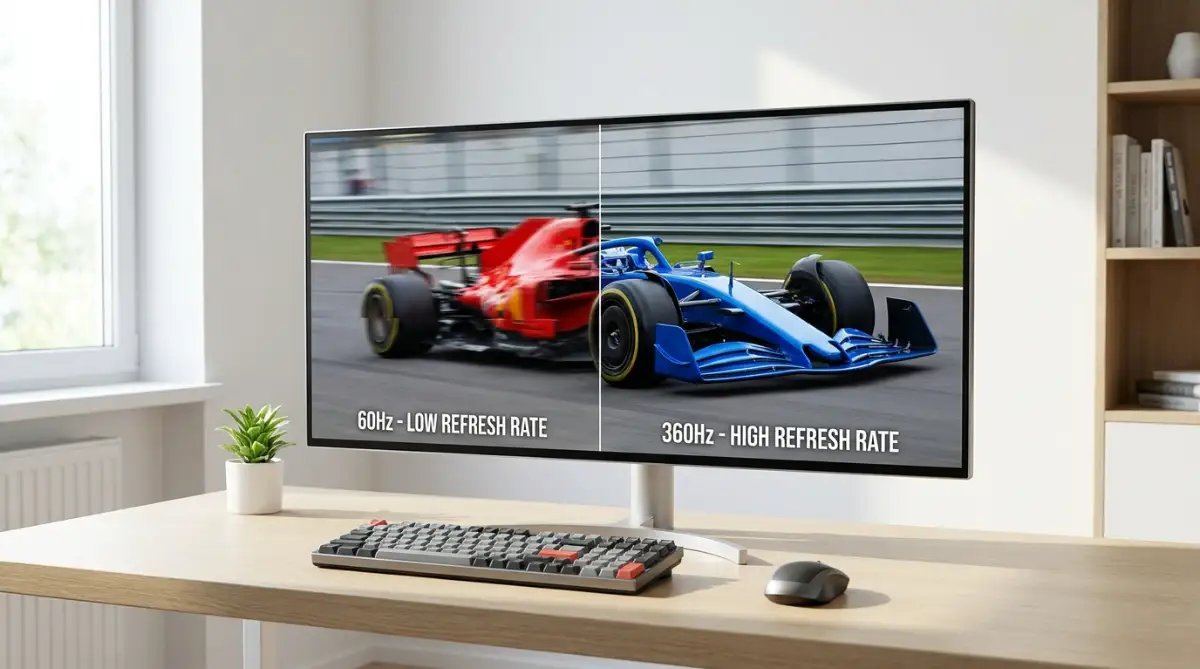
The basic term Refresh Rate simply means how many times per second your screen can draw a brand-new picture. We measure this exact drawing speed in a unit called Hertz (Hz).

If your display has a basic 60Hz label on the box, it draws 60 separate still pictures every single second. A premium 120Hz screen draws exactly 120 pictures in that exact same second. It is truly that simple.

Why Drawing Speed Directly Affects Your Eye Health

When a basic screen draws pictures too slowly, your active brain can slightly notice the tiny black gaps between the images. This highly annoying gap is what we call "stutter" or "screen flicker."

Even if you do not consciously see the stutter with your eyes, your small eye muscles are working overtime. They are constantly trying to focus on those rapidly jumping images. This constant muscle tension is the exact scientific reason behind digital eye strain and afternoon headaches.

When you finally upgrade to a faster premium screen, those ugly gaps completely disappear. The motion becomes incredibly smooth, looking exactly like real life outside your window.

Your tired eye muscles finally get the chance to relax. Reading fast-scrolling text becomes completely effortless, and fast-moving video game objects stay perfectly sharp.

Myth vs Reality: The Great Number Chase

Let us stop for a quick moment and clear up a massive industry myth that costs people thousands of dollars.

  • The Industry Myth: You must always buy the absolute highest Hz monitor available in the store to get a premium experience.
  • The Honest Reality: Human eyes have strict physical limits, and your specific daily tasks dictate what you actually need to buy.

If you only use your computer to type simple emails, read text blogs, and watch standard Hollywood movies, a 60Hz or 90Hz screen is absolutely perfect. You will not notice any massive difference going higher, and you will save a ton of money.

However, if you scroll through long spreadsheet documents quickly, edit professional videos, or play highly competitive games, everything changes. Jumping to a 120Hz or 144Hz screen is a complete game changer for these heavy tasks. It physically feels exactly like upgrading from a bumpy dirt road to a freshly paved, highly expensive highway.

The Pipe and Pump Reality: Hz vs FPS

One of the biggest money-wasting mistakes I see people make is confusing Refresh Rate (Hz) with Frames Per Second (FPS). They sound highly similar, but they are completely different things. They must work perfectly together as a team.

Let us use a very simple water pipe analogy to make this crystal clear. Imagine your computer's main brain (the graphics card) is a powerful water pump. The actual water it pumps out is the FPS.

Your new premium monitor is simply the plastic pipe that carries the water. The physical size of the pipe is the Hz limit.

If your old computer pump is only strong enough to push 60 drops of water per second, buying a massive 144-drop pipe is totally useless. The extra empty space inside the big pipe just sits completely unused.

In actual tech terms, if your current computer can only generate 60 FPS, buying a premium 144Hz monitor is a massive waste of cash. You will still only see exactly 60 frames on the glass. Before ever buying a premium gadget, you must always ensure your computer pump is powerful enough to feed it properly.

Pro Insight: The Secret Weapon of Variable Rates

Modern premium displays have a highly advanced secret weapon that older office screens completely lack. It is a smart technology called Variable Refresh Rate (VRR).

In the recent past, old monitors were incredibly stubborn. They would only draw their pictures at one fixed speed, no matter what happened inside the computer.

If the computer got too hot, slowed down, and missed a single beat, the screen would completely panic. It would accidentally show half of one picture and half of a completely different picture. This creates a highly distracting, ugly rip right across the middle of your screen, which experts call "screen tearing."

Modern premium gadgets are beautifully smart. They actively talk back and forth with your computer in real time.

If your computer suddenly slows down during a heavy task, the screen instantly slows its drawing speed to perfectly match it. When the computer cools down and speeds back up, the screen instantly speeds up too.

This creates a flawless, completely tear-free viewing experience from start to finish. If you are shopping for any high-end display right now, making absolutely sure it has this variable feature is non-negotiable.

The Sneaky Detail: Why Response Time Matters Too

We absolutely cannot talk about smooth screen motion without quickly discussing Response Time. This is the sneaky, hidden specification that big brands often try to hide deeply in the tiny fine print.

While the general refresh rate is about how often the screen draws a fresh picture, response time is totally different. It is about how fast the millions of tiny individual pixels can physically change their colors.

Imagine a bright red sports car driving incredibly fast on a wet, slippery road. If the rubber tires cannot grip the wet road quickly enough, the car leaves a long, ugly skid mark behind it.

If a premium monitor has a terribly slow response time, the tiny pixels cannot change from pitch black to bright white fast enough. As a direct result, fast-moving objects leave a highly annoying blurry trail behind them. We technically call this "ghosting."

You could easily own a blazing fast 240Hz screen, but if the physical response time is slow, you are in trouble. Every fast movement on the screen will instantly look like a blurry, smudged mess. For the absolute ultimate premium experience, you always want a listed response time of 3 milliseconds or much lower. This strict rule ensures that every single frame remains incredibly sharp.

The Component Lottery: How Screen Materials Change Everything

Not all premium screens are built using the exact same physical materials. The actual internal material inside your heavy monitor heavily dictates how good the refresh rate will truly look.

Currently, there are three main types of physical panels you will easily find in the high-end premium market. These are known as IPS, VA, and OLED. Each material handles high-speed motion completely differently from the others. Let us break them down so you know exactly what you are paying for today.

If you are a visual learner, watch this quick video breakdown of how IPS, VA, and OLED screens actually look in real life before reading my detailed guide below!

  • IPS Panels: These are widely considered the safe gold standard for highly accurate colors. They offer amazing viewing angles, meaning the picture looks completely perfect even if you sit far to the side. Modern premium IPS panels have fantastic, highly reliable refresh rates. This makes them an incredibly safe and smart choice for almost anyone.
  • VA Panels: These specific screens are highly famous for their deep, incredibly dark black levels. If you heavily love watching scary movies in a pitch-dark room, a VA screen looks absolutely amazing. However, the physical materials inside naturally struggle with fast color response times. Even a very expensive high Hz VA panel might show some blurry trails during very fast action scenes.
  • OLED Displays: This specific material is the current absolute king of the premium screen market. OLED panels amazingly do not use a standard glowing backlight at all. Instead, every single microscopic pixel independently produces its very own light. Because of this magic, their physical response time is nearly instant. A basic 120Hz OLED will actually feel significantly smoother and much clearer than a 120Hz standard IPS screen.

By highly understanding these basic physical differences, you stop guessing and hoping. You can confidently walk into any tech store, simply look at the side label, and know exactly how the screen will perform at home.

The Hidden Bottleneck: The Cable Trap

Sometimes, you buy the perfect premium monitor, bring it home, but the image still looks totally terrible. The real secret culprit is very often the super cheap cable hiding quietly behind your desk.

High refresh rates legally require a massive amount of digital data to travel quickly from your computer directly to the screen. An old, beaten-up, or cheap plastic wire simply cannot carry that much heavy information.

If you accidentally use an outdated HDMI cable from an old DVD player, your brand-new premium 144Hz monitor will safely lock itself. It will drop back down to a basic, boring 60Hz. The cheap wire literally chokes the heavy data stream.

To actually get the premium, buttery experience you heavily paid for, you must specifically use high-bandwidth cables. Always look for bold terms like "DisplayPort 1.4" or "HDMI 2.1" when setting up your new expensive gear.

These highly modern cables are exactly like adding extra fast lanes to a crowded highway. They easily let all the heavy visual data flow freely without any annoying traffic jams.

Taking Action: Making the Right Purchase

We have successfully covered a massive amount of technical ground today. Now, how do you actively apply this fresh knowledge to your next big purchase?

I always tell my private consulting clients to deeply look at their own daily habits first. Sit down and write down exactly what you actually do on your glowing screen for the most hours of your day.

If you are a heavy reader, a busy writer, or a complex coder, focus mostly on finding a screen with great text contrast. Pair that with at least a solid 90Hz speed. The smooth scrolling will beautifully save your tired eyes during those highly long night shifts.

If you are a highly creative professional who regularly edits fast-paced video footage, exactly 120Hz is your absolute sweet spot. It successfully provides the absolute perfect balance of true color accuracy and eye-pleasing smoothness.

Always deeply remember that you are simply buying a practical tool to improve your own daily life. Do not easily get caught up in the highly aggressive marketing numbers game played by big brands. Trust your own two eyes, clearly understand your actual computer hardware limits, and actively choose the premium gadget that makes your daily digital journey highly comfortable.

Unlocking the Full Power of Your Premium Monitor

Buying an expensive display is honestly just the first step of your tech journey. Many people bring their beautiful new screens home, plug them in, and completely miss out on the premium features.

I want to share a few insider secrets that hardware manufacturers rarely put on the front of the box. These simple adjustments will make sure you get every single drop of performance you paid for.

The Software Switch Everyone Forgets

This is easily the biggest mistake I see when visiting a friend's home office. They proudly show off their brand-new high-speed gaming or editing monitor.

I sit down, move their mouse, and immediately notice the motion is incredibly choppy. They bought a 144Hz screen, but they never told their computer to actually use it.

By default, almost every single Windows and Mac computer safely locks itself to a standard 60Hz. Your operating system does not automatically detect your new premium hardware and change the speed for you.

I made this exact embarrassing mistake when I bought my first high-speed screen. I used it for an entire year on the basic, slow setting because I wrongly assumed it would set itself up right out of the box! Always check your display settings manually before you get frustrated with your new tech.

You must physically go into your computer's advanced display settings and manually flip the digital switch. Buying a high-end display and leaving it at default settings is exactly like buying a luxury sports car and never shifting out of first gear.

Take two minutes today to open your display properties, find the refresh rate dropdown menu, and select the highest number available. You will instantly feel the heavy mouse cursor transform into a smooth, gliding pointer.

Taming the Overdrive Menu

If you press the physical buttons on the back of your monitor, you will discover a hidden menu. Inside this menu, you will likely find a highly important setting called "Overdrive" or "Response Time."

This setting controls exactly how much electrical voltage is sent to the tiny pixels inside your screen. Sending more electricity makes the pixels change their colors much faster.

However, many people blindly set this to "Extreme" or "Maximum" thinking it will give them the best possible performance. This is a massive trap that actively ruins your picture quality.

If you push too much electricity into the pixels, they change colors too fast and actually overshoot their target. This creates an ugly, glowing white halo behind fast-moving objects, which tech experts call "inverse ghosting."

Imagine you are running at full speed toward your house, but you cannot stop in time and run right past your front door. That is exactly what your pixels are doing on the maximum overdrive setting.

I highly recommend testing the "Normal" or "Medium" overdrive setting instead. This specific middle ground usually provides the perfect balance of fast pixel response without causing ugly visual errors.

Protecting Your Eyes in the Long Run

Even the absolute best screen in the world cannot save you if your physical environment is completely wrong. High refresh rates reduce eye strain by eliminating invisible screen flicker, but they do not solve bad room lighting.

If you sit in a pitch-black room staring at a bright white screen, your pupils are constantly expanding and shrinking. This heavy eye muscle workout naturally leads to severe headaches.

To easily fix this, consider placing a soft, warm lamp directly behind your monitor. This simple technique is called bias lighting, and it creates a highly comfortable transition between your glowing screen and the dark wall behind it.

Additionally, you should actively practice the famous 20-20-20 rule throughout your heavy workday. Medical experts often discuss the deep importance of preventing digital eye strain by resting your eyes naturally. Every 20 minutes, simply look at an object 20 feet away for exactly 20 seconds.

Finally, do not forget the most basic physical maintenance of your expensive hardware. A high refresh rate means absolutely nothing if you are looking through a thick layer of oily fingerprints.

Taking just a few minutes a week to safely remove dust and smudges from your laptop at home ensures your picture remains crystal clear. A clean display allows you to actually see the beautiful, smooth motion you heavily invested in.

Silent Setup Disasters That Ruin Your Experience

Instead of just giving you a boring list of regular mistakes, let us look at some highly realistic tech disasters. These are actual scenarios where smart people accidentally ruined their expensive setups.

By deeply understanding these exact situations, you can safely avoid repeating their frustrating mistakes.

The Console Gamer's Regret

Let us imagine a person who just bought the latest, highly expensive gaming console for their living room. They read online that high refresh rates are amazing, so they rush out and buy a massive 240Hz PC monitor.

They bring it home, plug in their console, and excitedly load up their favorite racing game. They instantly realize they just wasted hundreds of dollars.

Current home gaming consoles have strict physical limits built into their main hardware. They simply cannot push anything higher than 120 frames per second, no matter what you do.

The console completely ignores the extra 120Hz speed sitting inside that expensive monitor. You should always strictly match your brand-new display to the maximum limit of the machine feeding it.

The Docking Station Bottleneck

This is an incredibly common disaster for people who successfully work from home. You have a powerful work laptop and a beautiful premium monitor sitting on your desk.

To keep your desk looking clean, you plug everything into a cheap little USB hub or a basic docking station. Suddenly, your premium screen starts randomly dropping connection, and the smooth motion completely disappears.

You just forced a massive multi-lane highway into a tiny dirt road. Cheap USB hubs simply do not have the high data bandwidth required to carry heavy visual information.

They easily choke the data stream, forcing your expensive monitor to drop down to a very slow, painful speed. When setting up an ideal home office space, business professionals constantly recommend understanding your home office setup requirements deeply.

Always plug your high-end display cable directly into the main port on your computer. If you must use a hub, actively spend the extra money on a high-bandwidth Thunderbolt dock to keep the data flowing perfectly.

The Content Creator's Nightmare

Let us look at a highly motivated writer who spends ten hours a day typing long articles. They decide to start a successful freelance writing journey and want a better screen to protect their eyes.

They accidentally buy a monitor specifically built for competitive e-sports. It has a massive 360Hz refresh rate, but it uses extremely cheap TN panel materials that wash out all the text colors.

They spent heavily on blistering speed they will never actually use for typing. Meanwhile, the actual text contrast is so terribly weak that they get a headache just trying to read their own drafts.

This happens when you buy an extreme specialty tool for the completely wrong job. If you primarily read, type, and watch standard videos, you desperately need deep contrast and rich colors above everything else.

A highly colorful 90Hz or 120Hz IPS display will serve a busy writer a thousand times better than a washed-out 360Hz gaming panel. Always prioritize your main daily tasks before you ever look at the big numbers on a retail box.

Your Personal Action Plan for Tomorrow

We have officially covered a massive amount of tech ground together today. You now clearly understand how still images create smooth motion, how hidden software settings trick us, and how simple cable mistakes ruin everything.

You no longer have to feel highly intimidated when walking into a big electronics store. You are fully armed with the exact same practical knowledge that professional tech reviewers use every single day.

I want you to actively do something with this specific information right now. Do not just close this tab and forget what we discussed.

Take a quick look at the screen you are currently using to read these exact words. Dive straight into your computer settings and actively check if you are getting the speed you deserve.

Clean off those smudges, adjust your background lighting, and make your daily digital experience truly comfortable. Creating a beautiful visual environment is highly rewarding.

Once your eyes are finally happy, you might even want to upgrade the rest of your daily sensory experience. For example, perfectly pairing a smooth display with deep, rich audio is a complete game-changer.

If you are highly curious about improving your audio next, you can easily explore how the mechanics of spatial audio are completely changing the way we listen to media.

Technology is supposed to make our daily lives easier, highly comfortable, and significantly more fun. Take total control of your premium gadgets today, trust your own physical comfort, and build a digital workspace that actually works for you.

Looking back, fixing my display setup was one of the smartest things I ever did for my daily health and focus. You do not have to live with tired eyes and annoying headaches for another minute. Take five minutes right now to adjust your settings, and I promise you will feel the amazing difference today.

Disclaimer: The content provided in this article is strictly for educational and informational purposes only. Hardware specifications, software settings, and tech compatibility heavily depend on your specific computer models. Always double-check your personal system requirements before purchasing any premium electronic devices. Additionally, if you experience severe or ongoing eye pain, please consult a certified medical professional immediately.

THANK YOU