
The Invisible Threat to Your Digital Wealth

You check your phone, open your crypto app, and your balance says exactly $0.00. I almost threw up when this exact thing happened to a good friend of mine last year. Leaving your digital money on a public exchange is just like leaving a stack of hundred-dollar bills on a park bench—eventually, someone is going to take it. Today, I am going to show you how to lock down your money so tight that nobody can touch it but you.

What You Will Learn in 3 Minutes:

  • The IOU Trap: Why having money on an exchange means you do not actually own it.
  • The USB Shield: How a simple $60 piece of hardware stops remote hackers entirely.
  • The $2 Rule: My personal trick to move large amounts of money without sweating.
  • The Cloud Danger: Why taking a picture of your backup words is the worst mistake you can make.

Why Honest Investors Fall into Dangerous Traps:

  • Trusting the "bank" mindset: People assume a crypto exchange acts exactly like a traditional bank. They do not realize that if the exchange goes bankrupt or gets hacked, your money is completely uninsured.
  • Influencer hype over security: Many social media personalities push you to keep funds on shiny new exchanges so you can trade quickly. They rarely talk about the massive security risks of leaving your money online.
  • Confusing technical jargon: When you try to learn about offline storage, you run into complicated developer terms. The confusing language makes normal people give up and choose the risky, easy path.
  • Fake apps and phishing links: Bad actors create fake digital wallet apps that look exactly like the real ones. Honest users download these traps, thinking they are doing the right thing, and hand their money directly to thieves.
The Heavy Mental Toll of Poor Security:

  • Sleepless nights: Every time you read a news headline about a massive digital heist, your anxiety spikes. You lie awake wondering if your chosen platform is the next target.
  • Constant portfolio checking: You develop an unhealthy obsession with opening your app every single hour. You are not checking the price; you are simply making sure your money is still there.
  • Strained relationships: Financial anxiety often leads to a short temper with your family. The stress of potentially losing your life savings makes you irritable and completely exhausted.
  • Loss of investing confidence: The fear of making a technical mistake paralyzes you. You stop exploring good investment opportunities because the underlying fear of losing everything holds you back.

We need to look closely at why this cycle of constant fear continues. When you keep your coins on an internet exchange, you do not actually own them.

You only own an IOU from that specific company. If that company decides to freeze your account for a routine check, you are completely locked out of your own money.

This lack of control is the absolute root cause of your investing anxiety. Think about how you treat your physical cash in everyday life.

Quick Reality Check: Exchange vs. Offline Wallet

Security FeatureOnline ExchangePhysical Cold Wallet
Who Holds Your Keys?A third-party companyYou (100% control)
Remote Hacker RiskHigh (constant target)Zero (completely offline)
Sudden Account FreezesPossible at any timeMathematically impossible
Daily Stress LevelHigh (worrying about news)Zero (total peace of mind)

You would never leave a large stack of hundred-dollar bills sitting on a park bench while you go to sleep. Yet, leaving your entire digital portfolio on a hot, internet-connected exchange is exactly the same concept.

The good news is that you have the complete power to take total ownership of your assets. The moment you move your funds offline, the heavy burden of worry instantly disappears. You become your own bank manager, and the vault is entirely in your hands.

Building Your Unbreakable Offline Vault

Now that we understand the deep risks of online storage, let us talk about the ultimate solution. A cold storage wallet is a physical device that looks very much like a regular USB thumb drive.

However, it is built with military-grade encryption inside. Its only job is to generate and store your private keys completely offline.

Your private key is exactly like the master password to your digital wealth. If this key never touches the internet, remote hackers absolutely cannot steal it.

The Safe Box Analogy:

Think of the blockchain as a massive public locker room. Everyone can see the lockers, and everyone knows how much money is inside each one.

However, the only way to open a specific locker is with a unique, physical key. An online exchange holds that key for you, which is highly dangerous.

If a thief breaks into the exchange system, they take your key and empty your locker. A physical hardware device takes that key out of the exchange and puts it directly into your own pocket. Even if the entire internet burns down, your key remains perfectly safe in the palm of your hand.

If you are still a bit confused about how a physical piece of plastic can hold digital internet money, check out this short video below. It perfectly explains how cold storage actually works behind the scenes, and it makes the rest of this guide so much easier to follow!

Mastering the Ultimate Backup Strategy

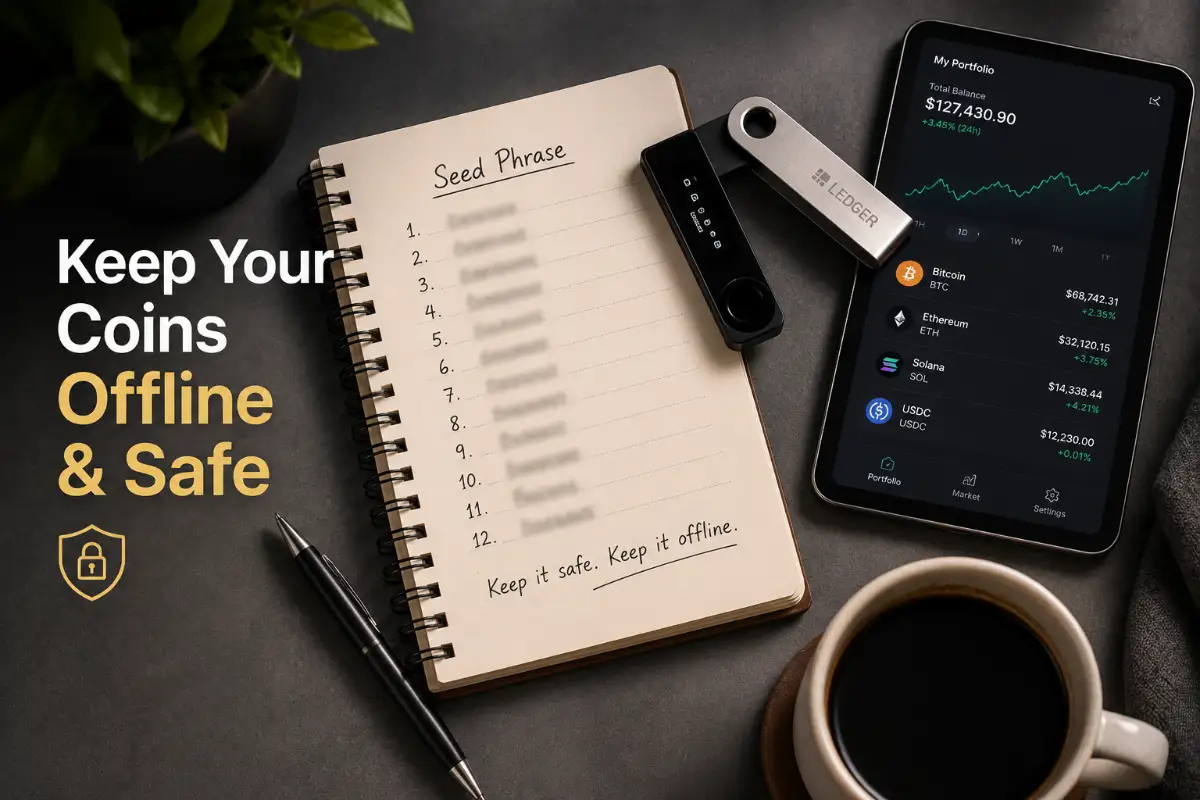
When you set up this physical device for the first time, it will give you a list of 12 to 24 random English words. This is known as your seed phrase or recovery phrase.

This step is the absolute foundation of your entire security system. You must take this specific step very seriously.

If you ever lose the physical device, or if it breaks, you do not lose your money. You simply buy a brand new device and type in those 12 to 24 words.

Your entire portfolio is restored instantly. This mathematical magic is what makes offline storage so incredibly powerful and resilient.

Real-Life Scenario: The Broken Device

Let us look at a highly practical example. Mark bought a hardware device to secure his entire savings. One day, his dog found the plastic device and completely chewed it up.

Mark did not panic at all. He knew his coins were not actually trapped inside the physical plastic; they live safely on the blockchain.

The broken device only held the access keys. Because Mark wrote his recovery words on a piece of paper and locked it in a fireproof safe, his money was perfectly secure. He simply bought a new unit, entered his words, and got right back to his investing journey.

The Strict Rules of Word Protection

Because this recovery phrase is so powerful, you must treat it with extreme caution. Anyone who sees these words has full, immediate access to your funds.

Here are the absolute rules for protecting your master password. If you follow these, your funds are mathematically impossible to steal.

Essential Do's:

  • Write the words down using a good pen and a piece of high-quality, durable paper.
  • Store this paper in a waterproof and fireproof safe inside your home.
  • Consider engraving the words into a solid metal plate for ultimate, long-term physical protection.

Critical Don'ts:

  • Never take a screenshot of your recovery words with your smartphone or tablet.
  • Never type them into a notes app or text document on your computer.
  • Never speak the words aloud near a smart speaker or mobile device.

Executing the Safe Transfer Protocol

Moving your funds from a risky online exchange to your secure offline device is a process that requires total focus. The biggest mistake new users make is rushing this step.

We are going to treat this exact process like moving large amounts of physical gold. Every single crypto transaction requires a specific receiving address.

This address looks like a long string of random letters and numbers. When you plug in your new physical device, its companion software will generate a brand new receiving address just for you.

The Test Transaction Method:

Before you send your entire life savings, you must always perform a small test transfer. Copy the receiving address from your new device software.

Go back to your online exchange, paste the address, and send a tiny amount, like two or three dollars. Wait a few minutes for the blockchain network to process the transfer.

Check your physical device software to see if the two dollars arrived safely. By doing this, you confirm that you copied the correct address and that the network is functioning properly.

Once you see the test money arrive, you can confidently send the rest of your funds. This simple habit completely eliminates the fear of sending money to the wrong digital location.

When I first bought my hardware device, I made the very silly mistake of trying to transfer all my coins at once without doing a test run. My hands were shaking the entire time, and I held my breath for ten whole minutes until the money finally showed up! Now, I always force myself to send a tiny two-dollar test first, which takes away all the stress of moving large amounts of money.

Why the Physical Button Stops Hackers

Let us look deeper into exactly why online platforms get compromised so frequently. Hackers do not usually break the underlying blockchain code; they attack human weakness.

They use social engineering to trick exchange employees, or they find a tiny flaw in the website's login system. When you use an offline wallet, you completely remove yourself from this massive digital battlefield.

A hacker sitting in a dark basement halfway across the world cannot physically reach into your desk drawer. They cannot press the physical buttons on your hardware device.

Every single transaction you make with an offline wallet requires physical confirmation. The device will show the exact amount and destination address on its tiny, built-in screen.

You must physically push a button on the actual hardware to approve the movement of funds. This creates an absolute physical barrier against theft.

Even if your personal computer is deeply infected with viruses and malware, the hacker cannot force the device to push its own buttons.

The transaction will simply sit there on your screen, waiting for your physical touch. This clever design keeps your wealth entirely secure from remote attacks.

Myth vs Reality in Crypto Storage

  • Myth: You need to be a highly skilled computer programmer to use offline storage safely.
  • Reality: Modern hardware devices come with beautifully designed, highly intuitive apps. If you know how to send an email or download a smartphone app, you have all the technical skills required to protect your assets today.
  • Myth: If I forget my device PIN code, my money is gone forever.
  • Reality: The PIN code only protects the physical device from someone who finds it. If you forget your PIN, you can simply reset the device using your physical paper backup words.

Taking control of your financial security is an incredibly empowering feeling. By setting up these physical barriers, you completely change your relationship with your digital investments. You transform from a worried passenger into the confident driver of your own financial future.

Mastering Advanced Offline Defense Strategies

To stay completely safe, you need to think like a professional security expert. Setting up a basic offline device is a great start, but we can make your setup absolutely bulletproof.

Let us look at a few highly advanced strategies that wealthy investors use to protect their massive portfolios. These methods cost zero extra dollars, but they add an invisible layer of armor around your money.

If you apply these expert techniques today, you will sleep perfectly well at night. You will never have to worry about clever hackers bypassing your basic defenses.

The Magic of the Hidden Passphrase

You already know that your 12 to 24 backup words are the master key to your digital vault. But what happens if a burglar breaks into your home and finds the piece of paper hidden in your drawer?

If they know what those words mean, they can steal your funds in minutes. This specific fear stops many people from feeling truly safe with physical backups.

The ultimate solution to this problem is called a custom passphrase, sometimes known as the "25th word." Almost all modern hardware devices offer this powerful feature hidden in their advanced settings.

When you turn on the passphrase feature, the device asks you to create an extra word or phrase. It can be a mix of letters, numbers, and symbols that only you know.

How the Passphrase Works in Real Life:

Your original 24 words open a standard vault on your device. When you add a custom passphrase, the device mathematically creates an entirely new, hidden vault.

You leave a small amount of money in the standard vault as a decoy. You keep the vast majority of your wealth in the hidden vault protected by your custom passphrase.

If a thief finds your piece of paper with the 24 words, they will only access the decoy funds. Without that secret 25th word locked inside your brain, the hidden vault remains mathematically impossible to open.

💡 My Real-Life Pro Tip: Do not try to be a genius and memorize your 25th word (passphrase). Brains forget things, especially under stress! Instead, I wrote my extra word inside a completely boring book on page 100, placed it on my regular bookshelf, and told my wife exactly where it is. Even if a thief finds my main 24-word paper in the safe, they will never think to look inside a dusty cooking book for the final missing piece.

Safe and Stress-Free Device Maintenance

Like your smartphone or laptop, physical storage devices require occasional software updates. These updates, known as firmware, patch new security threats and add support for new coins.

Many users get extremely nervous when it is time to update their device. They worry that a bad update might accidentally delete their private keys.

You must remember that your coins do not live inside the physical plastic. Even if an update completely breaks the device, your money is perfectly safe on the blockchain.

To perform a firmware update safely, you must always follow a strict routine. Never click on a link in an email telling you to update your device immediately.

Your Firmware Update Checklist:

  • Always open the official desktop application directly from your computer menu.
  • Make sure you have your physical paper backup nearby before starting the update.
  • Connect the device using a high-quality data cable directly to your computer.
  • Follow the on-screen instructions precisely and never unplug the device during the loading bar.

Hidden Dangers: What Ruins a Perfect Security Setup

Even with the best tools in your hands, human error remains the biggest threat to your portfolio. Scammers know they cannot break the mathematics of the blockchain.

Instead, they focus entirely on tricking you into making a terrible mistake. If you know exactly how these traps work, you can spot them a mile away.

Let us explore the most devastating mistakes new users make when trying to secure their funds. Avoiding these specific errors will save you from complete financial heartbreak.

The Bargain Hunter's Nightmare

Hardware storage devices typically cost between $60 and $200. Sometimes, people try to save money by buying a used device on eBay or a discount electronics website.

This is arguably the most dangerous mistake you can possibly make in the digital investment world. You must understand that second-hand hardware is often deeply compromised by the seller.

A common scam involves the seller opening the box, setting up the device, and writing down the recovery words. They then print a fake "instruction manual" that tells you to use those exact words.

The Trap Springs Shut:

You receive the cheap device, follow the fake manual, and deposit your life savings. Because the scammer already has the master key, they simply wait a few weeks and drain your entire account remotely.

Never try to save twenty dollars when protecting thousands of dollars. Only purchase your physical storage device directly from the official manufacturer's website. If you want to dive deeper into official purchasing protocols, the experts at Investopedia outline excellent standards for safe crypto storage.

The Digital Photography Blunder

We carry incredibly powerful cameras in our pockets all day long. When the device screen shows the 24 backup words, your first instinct is to pull out your phone and snap a quick photo.

You might think it is a harmless way to make a quick copy. In reality, you just destroyed the entire purpose of buying an offline device.

When you take a photo on your smartphone, that image is instantly uploaded to a cloud server. Tech companies scan these photos for data, and hackers frequently breach these cloud storage accounts.

If a hacker gains access to your photo gallery, they will run an automated script to find images containing words. Within seconds, your master key is exposed, and your funds are gone.

Always rely on a physical pen and thick paper. Keep the digital world completely separated from your master backup.

The "Helpful" Customer Support Agent

Eventually, you might run into a technical issue with your device app. You might post a question on a public forum like Reddit or Twitter to ask for help.

Within minutes, a highly professional-looking account will send you a direct message. They will claim to be official customer support and offer to fix your problem immediately.

They will direct you to a website that looks exactly like the official company page. The site will ask you to "synchronize" your device by typing your 24 backup words into the web browser.

The Cold Hard Truth:

Official customer support will never, under any circumstances, ask for your recovery phrase. The moment you type those words into a keyboard, the scammers instantly steal your money.

This social engineering tactic is incredibly common and highly effective. According to financial safety reports, Forbes frequently highlights how phishing scams trick honest people into handing over their private keys voluntarily.

Furthermore, scammers are getting smarter with technology. They use advanced software to create fake video tutorials that look extremely real.

If you understand how AI generates highly realistic images and text, you will quickly realize how easy it is for hackers to create fake support videos. Stay alert and trust no one asking for your secret data.

Answering Your Biggest Security Fears

When you first transition to self-custody, it is normal to have lingering doubts. Let us clear up the most common anxieties that hold people back from taking control.

Question: What if the company that built my device goes bankrupt?

Answer: You will not lose a single penny. Your device uses a universal open-source standard known as BIP39. If the original company shuts down tomorrow, you simply buy a device from a completely different brand. You enter your original paper backup words into the new brand's device, and your portfolio instantly reappears.

Question: Can a nasty computer virus jump into the physical device through the USB cable?

Answer: No, this is virtually impossible. The physical device acts as an isolated mini-computer. It only uses the USB cable to send a simple "Yes" or "No" signature to the blockchain. The actual private keys never travel across the cable to your infected laptop.

Protecting your online presence directly correlates with proven strategies to maintain a healthy credit score over time. Good security habits protect your entire financial identity, not just your digital coins.

Your 48-Hour Action Plan for Total Financial Peace

Reading about security will not protect your money; taking immediate action is the only thing that works. You now have a complete understanding of how to build an unbreakable digital fortress.

You no longer have to rely on risky online platforms to safeguard your future. You hold the power to become your own bank manager today.

Your Execution Checklist:

  1. Order Direct: Go directly to a reputable manufacturer's website right now and order a physical storage device.
  2. Prepare the Vault: While waiting for delivery, buy a small fireproof document bag and a high-quality pen.
  3. The Solo Setup: When the box arrives, go to a quiet room alone. Write down your recovery phrase slowly and clearly.
  4. The Test Run: Wipe the device completely clean and restore it using your written words. This proves your backup works perfectly.
  5. The Great Migration: Send a tiny test amount first. Once verified, move your entire portfolio off the exchange and into your total control.

Moving your crypto to a physical hardware wallet might feel a bit intimidating on day one, but it is hands-down the smartest move I ever made with my finances. Once you take your keys off the internet, you stop worrying about platform bankruptcies, suspicious login alerts, and exchange freezes. Follow the steps above, take your time with the test run, and take true control of your wealth today!

Disclaimer: The information provided in this article is for educational and informational purposes only. It does not constitute financial, investment, legal, or professional advice. Cryptocurrency markets are highly volatile, and securing digital assets involves inherent technical risks. Always conduct your own thorough research and consider consulting with a certified financial advisor or security professional before making any investment decisions or moving significant amounts of digital assets.

***THANK YOU***